Learn — By WATMM Desk —
Recording guitar at home: DI, amp mics and acoustic placement
Home guitar recording comes down to three routes: plug straight into the interface (DI), put a microphone on an amp, or mic an acoustic. This guide covers each one in practical steps, with mic positions from Shure's SM57 user guide and the case for always keeping a clean DI track from Sound On Sound, read on 25 Oct 2026.
Key facts
- Shure's SM57 user guide lists four amp positions: 25 mm (1 in.) on-axis for "most attack, emphasized bass", 150 to 300 mm (6 to 12 in.) for a "full, balanced sound", 0.5 to 1 m back for a "softer attack, thin, reduced bass sound", and aiming at the cone edge for a "thinner, reduced bass sound".
- The same guide says that within 6 mm (1/4 in.) of the source the mic boosts bass by 6 to 10 dB at 100 Hz (proximity effect), and that "there is no single correct microphone position."
- Sound On Sound (Robin Vincent, Jan 2026) says a re-amp box "takes the output from the interface, lowers its level, increases the impedance and makes it unbalanced", so a clean DI take can be sent back through an amp later.
Guitar is the instrument most home producers own and the one they most often record badly. There are three quite different ways to do it: plugging in directly, miking an amp, and miking an acoustic. Each has its own small set of decisions. Get those right and a modest setup will sound like a record; skip them and no plugin will rescue the take.
This guide walks through each route in the order most home players meet them. It assumes you already have an audio interface and a DAW. If you are still choosing an interface, start with our guide to choosing an audio interface, and pay attention to whether it has an instrument (often labelled Hi-Z or INST) input.
Before you press record
Three things matter more than any mic or plugin.
- Fresh strings and a setup. Old strings go dull and lose intonation. Tune before every take, not every song, because a guitar drifts as it warms in your hands.
- Your playing. Mics and DIs capture fret buzz, string squeak and timing drift with brutal honesty. Play the part to a click until it is boring before you record it.
- Latency. If you monitor through plugins, a high buffer size makes the guitar feel late and your timing suffers. Our explainer on latency and buffer size shows how to set it low while tracking and raise it again for mixing.
Route 1: DI into the interface
DI (direct input) means the guitar cable goes straight into the interface's instrument input. You get a clean, dry signal with no room, no amp and no noise from the neighbours. On its own it sounds thin and plain, which is the point: it is raw material.
- Plug into the input marked for instruments, or switch the input to instrument mode. A passive guitar wants that input, not a line or mic input.
- Set gain while playing the loudest part of the song. Aim for healthy peaks well short of clipping; at 24-bit there is no prize for recording hot. Our gain staging guide explains why headroom is free.
- Monitor through an amp simulator if you like, but record the clean signal.
That last step is the habit that pays off most. Sound On Sound's guide to re-amping (Robin Vincent, January 2026) puts it plainly: "There are times when your best course of action is to record the guitar first and worry about the tone later." A clean DI lets you change amp simulators months later, or send the track back out to a real amp. For that, a re-amp box "takes the output from the interface, lowers its level, increases the impedance and makes it unbalanced", so the amp sees something that looks like a guitar again.
Route 2: a microphone on an amp
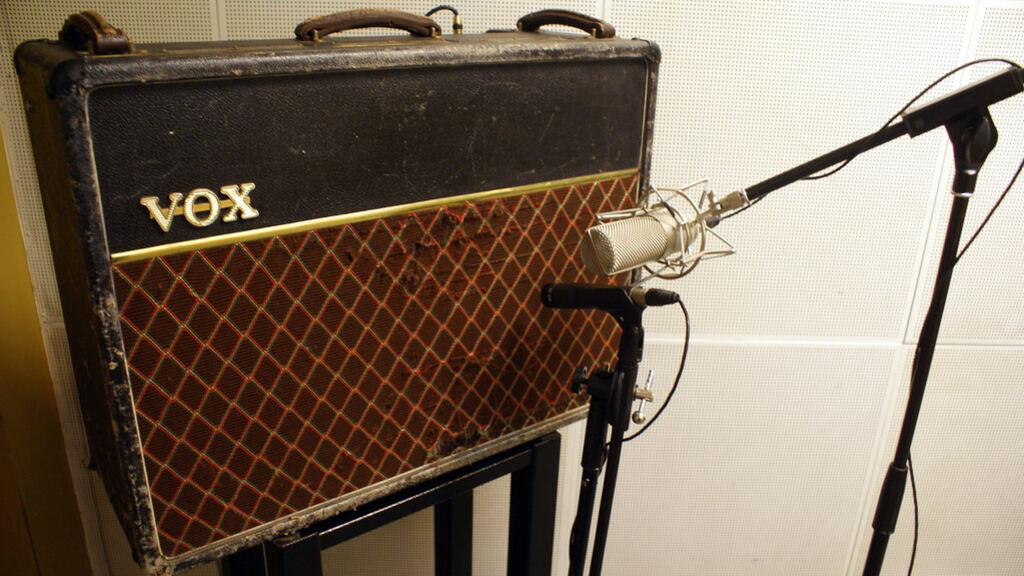
If you own an amp you love, mic it. The classic tool is a dynamic mic such as the Shure SM57, and its user guide is still one of the clearest maps of where to put it. The SM57 user guide gives these positions for guitar and bass amps:
| Position | Shure's description |
|---|---|
| 25 mm (1 in.) from the speaker, on-axis with the cone | "Most attack, emphasized bass" |
| 150 to 300 mm (6 to 12 in.) away, on-axis | "Medium attack, full, balanced sound" |
| 0.5 to 1 m (18 in. to 3 ft) back, on-axis | "Softer attack, thin, reduced bass sound" |
| On-axis with the edge of the cone | "Thinner, reduced bass sound" |
The bass boost close in is proximity effect. Shure says that when the source is within 6 mm (1/4 in.) the mic "boosts bass frequencies (by 6 to 10 dB at 100 Hz)". So moving the mic is an EQ control: closer and centred for weight and bite, towards the edge of the cone for less low end and less harshness. Paul White's Sound On Sound article on recording electric guitar makes the same point from the other direction: "Moving the mic to one side produces a less toppy sound."
A practical routine:
- Find the best-sounding speaker in the cabinet with the amp at low volume, using your ear close to the grille (briefly, and quietly).
- Start close, pointed at where the dust cap meets the cone.
- Record eight bars, move the mic about 2 cm towards the edge, record again. Do this three or four times and compare on headphones.
- Keep the take you like. Do not reach for EQ until you have tried position.
Amps do not have to be loud to sound good on a recording, and in a flat they often cannot be. A small amp turned to a sensible level, close-miked, usually beats a big amp turned down to a whisper. Record a DI at the same time through a splitter or a DI box with a thru output, so you have a safety copy.
Route 3: miking an acoustic guitar
Acoustic guitar is closer to recording vocals at home than to recording an amp: the room matters and so does distance. A condenser mic is the usual choice because it picks up the detail of the strings, but a dynamic mic will do if that is what you own.
- Do not aim at the sound hole. It is where the boom lives. Proximity effect makes it worse.
- Start around where the neck meets the body, about 20 to 30 cm away, and adjust by ear. Move further out for more air, closer for more definition.
- Treat the space around you. A duvet behind the player and a rug underneath do more for an acoustic than a better mic does. Our guide to budget acoustic treatment has cheap options.
- Keep still. A few centimetres of movement changes the tone. Sit on a chair that does not creak and keep the guitar at the same angle between takes.
If the guitar has a pickup, record it on a second track too. On its own a piezo pickup tends to sound quacky, but blended low under the mic it can add focus.
Double-tracking and takes
For rhythm parts in rock and pop, the wide guitar sound on many records comes from playing the part twice and panning the takes left and right, not from copying one take. Two real performances differ slightly in timing and tone, and that difference is what creates the width. Record each side as a separate full take.
For leads, record several passes and comp the best phrases, the same way you would a vocal. Label takes as you go; you will not remember which was "the good one" tomorrow.
A quick session checklist
- New strings, tuned, guitar intonated.
- Low buffer size for tracking.
- Always record a clean DI, even when you mic an amp.
- Gain set on the loudest part, with plenty of headroom.
- Try at least three mic positions before touching EQ.
- Double-track rhythm parts with real second takes.
- Name and note your takes.
What we think
The most useful thing a home guitarist can record is the one nobody will ever hear: the clean DI. It is the cheapest form of insurance in music production. Amp simulators keep improving, tastes change, and the tone that sounded perfect at midnight often sounds fizzy in daylight. A dry track turns tone from a decision you had to get right on the day into one you can revisit, which is exactly what you want when you are your own engineer, producer and player at once.
The flip side is a trap we see often: treating the DI as permission to never commit. Endless re-amping is a way of avoiding the song. Our advice is to record the DI, then choose a tone you like and finish the track with it. Keep the DI for the remix, the live version, or the day you finally buy the amp you wanted. The point of keeping options open is so that you can stop worrying about tone and get back to playing.
Sources
- SM57 User Guide (mirror of the Shure manual), Shure Incorporated (primary source). Accessed 25 Oct 2026.
- Studio One: Re-amping Explained, Sound On Sound. Accessed 25 Oct 2026.
- Recording Electric Guitar, Sound On Sound. Accessed 25 Oct 2026.
Researched with AI assistance, written and checked by WATMM Desk.