Learn — By WATMM Desk —
Gain staging in 32-bit float: what floating point fixed, and what it did not
A 32-bit float DAW mix bus is very hard to clip, and a 32-bit float field recorder can save a take that hit the red. But your converters, your analogue-modelled plugins and your meters still live in a world with a ceiling. Here is what changed, what still matters, and the habits worth keeping.
Key facts
- Sound On Sound (Hugh Robjohns and Matt Houghton, September 2013) puts the internal dynamic range of a 32-bit floating-point system at about 1500dB.
- Zoom says its F3 records 32-bit float with two AD converters per input at different gains, so input gain "does not need to be adjusted", and the data in the file "is not clipped".
- Professional converters are typically aligned so 0dBFS equals +24dBu, according to Sound On Sound, so the analogue and conversion stages still have a hard ceiling.
- Analogue-modelled plugins have a calibrated sweet spot: the Sonimus Satson manual offers 0VU settings from -20 to -12dBFS and recommends 0VU = -18dBFS for gain staging.
You have probably heard both halves of the argument. One camp says gain staging is dead because your DAW runs in floating point and cannot clip. The other still trims every channel to a precise number before touching an EQ. Both are partly right, and the useful skill is knowing which stage of your signal chain you are talking about.
The short answer: 32-bit float removed most of the risk of clipping inside the computer, and float field recorders can rescue an over-hot take. It did nothing for the analogue parts of your chain, the converters, plugins that model analogue gear, or the meters you mix by, so sensible levels still matter there.
This guide is about levels, not loudness. If you want to know where to finish a master, read what LUFS to master to in 2026.
What does 32-bit float actually change?
Fixed-point audio, the 16- and 24-bit formats most of us grew up with, has a hard top called 0dBFS (decibels relative to full scale). Push past it and the waveform is flattened: clipping. Floating point stores each sample as a number plus a scaling exponent, so the same file format can describe very quiet and very loud signals.
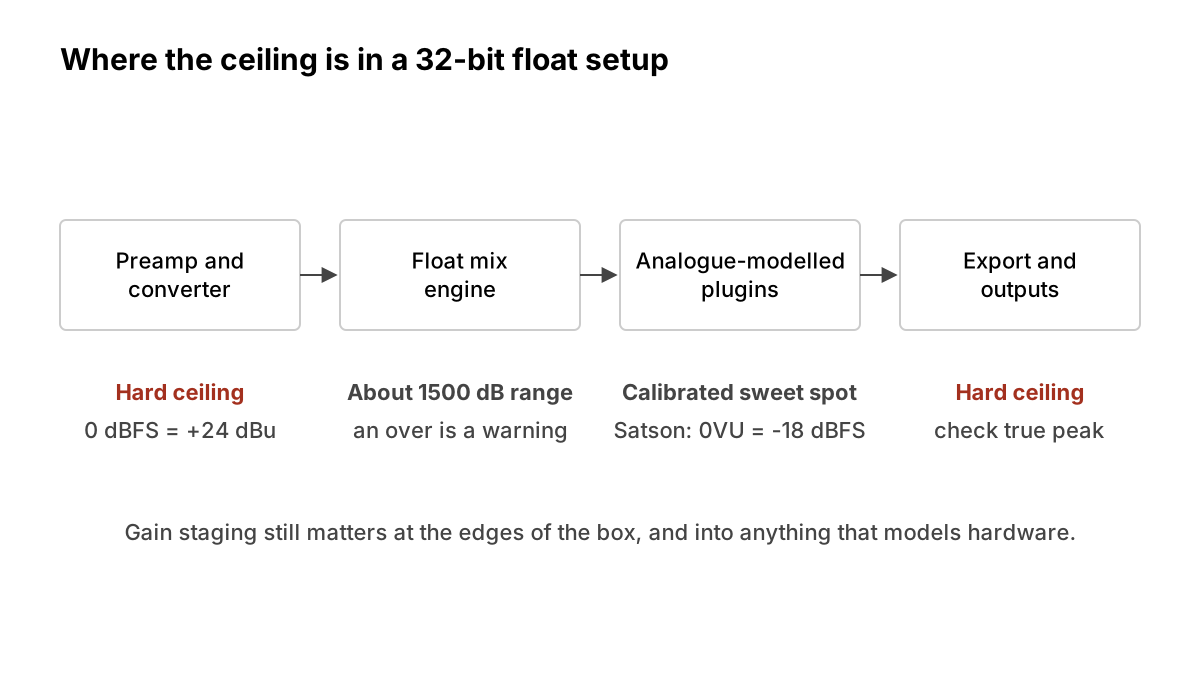
The numbers are large. Hugh Robjohns and Matt Houghton, writing in Sound On Sound, gives "a dynamic range of a whopping 1500dB in a 32-bit floating-point system." In practice that means a channel in your DAW can go "over" on its meter and the audio is still intact inside the mix engine, as long as you bring it back down before it leaves the box.
That is the real change. A red light on a single track or bus inside a floating-point mixer is a warning, not damage.
Can a 32-bit float recorder really not clip?
Partly. This is where the marketing gets ahead of the physics, so it is worth reading the manufacturer's own words.
Zoom's F3 manual says the recorder has "two AD converters with different input gains" for each input, and that it monitors both and picks the one that gives the best result. Because it records 32-bit float, the manual says, "the input gain does not need to be adjusted", and "the data in the 32-bit float WAV file itself is not clipped." A take that looks clipped on screen can be turned down later to recover the unclipped waveform.
Two things make that work: the float file format and the dual-converter front end. The float format alone cannot save a signal that was already flattened before it reached the converter. A typical audio interface has one converter per input with a gain knob in front of it. Recording into a 32-bit float session through that interface does not change what happens at the converter. If the preamp or converter clips, the float file stores a clipped waveform perfectly.
The same manual has a warning worth repeating: playing a 32-bit float file through an app that does not support the format "could make an unexpected loud noise and damage your ears." Huge headroom cuts both ways, so watch your monitor level.
Where does gain staging still matter?
1. At the converters and anything analogue
Converters are the border between a world with infinite room and one with a fixed ceiling. Sound On Sound notes that professional converters are commonly aligned so that 0dBFS corresponds to +24dBu, which matches the clipping point of most analogue gear. Your mic preamp, any outboard compressor and your interface's input stage all clip at a real voltage. Set input gain so the loudest moments of a performance have room to spare. Sound On Sound suggests about 20dB of headroom in the DAW and says this "won't compromise the digital noise floor."
The same applies on the way out. When your master leaves the DAW as a 16- or 24-bit file, or goes to your interface's outputs, it is back under a hard 0dBFS ceiling.
2. In plugins that model analogue gear
This is the part people forget. A floating-point EQ does not care what level you feed it. A plugin modelled on a console, tape machine or valve compressor often does, because it reproduces how the original reacts to level. Feed it hotter and it saturates more; feed it very quietly and you may barely hear its character.
Developers pick a calibration point that maps a digital level to the hardware's nominal "0VU". The Sonimus Satson manual offers 0VU settings of -20, -18, -16, -14 and -12dBFS, and says 0VU = -18dBFS is "the best way to establish good gain staging in a mix." It also notes that raising the input level produces "more aggressive saturation for creative effects." Sound On Sound makes the general point that analogue models often behave well within normal operation but "start to fall down when you push them outside that range."
The lesson: there is no universal "-18 rule". Check the manual of each modelled plugin for its own calibration, and treat input level as one of its controls.
3. In compressors, gates and anything with a threshold
Any dynamics plugin with a fixed-range threshold depends on what level arrives. If a track arrives 20dB too hot or too quiet, the threshold you want may sit at the end of its range, and presets made for normal levels will behave very differently. Sound On Sound suggests aiming for peak readings of around -10dBFS between plugins, with each plugin's output roughly matching its input. Matching levels also stops you being fooled by loudness when you toggle a plugin on and off, a trap we cover in ten bedroom mix mistakes.
4. On your meters
Most DAW channel meters show sample peaks. Sound On Sound warns that the reconstructed analogue waveform "can reach 3dB or more above 0dBFS" between samples, and a sample-peak meter will not show it. The international standard for measuring this is ITU-R BS.1770, whose current version (BS.1770-5, November 2023) covers both loudness and true-peak level. Use a true-peak meter on the master before you export.
Meters also shape habits. Sound On Sound suggests setting the loudest track to peak between -12 and -18dBFS, with faders starting near the -6dB mark so they sit in the range where small moves give fine control. The Satson manual goes further and argues that DAW peak meters are "not useful for mixing", preferring VU-style meters that behave more like the ear.
A simple routine that still works
- Record: set preamp gain so the loudest part of the take has plenty of room below 0dBFS. If you own a dual-converter float recorder, you can relax here, but still check your input.
- Before mixing: use a clip-gain or trim control so each track peaks in roughly the -18 to -12dBFS area. This keeps faders in a useful range and plugins near their sweet spot.
- Per plugin: match output to input, and read the calibration of any analogue model you use.
- Buses: an over on an internal bus is not fatal, but bring it down with the fader or a trim before it reaches anything modelled or the master.
- Master: check true peak, then export.
What we think
Floating point is a gift to musicians, and it is worth saying so plainly: a lot of anxiety about "the red light" comes from rules made for tape and early fixed-point systems. You can stop treating every channel meter as a cliff edge.
But "it can't clip" became an excuse to stop listening to level, and that is a loss. Level is a creative input. A tape model hit at -18dBFS and the same model hit at -6dBFS are two different instruments. The artists we admire who work in the box tend to treat gain the way a guitarist treats how hard they pick: deliberate, consistent and part of the sound.
So our view is this: drop the fussy, numbers-first gain staging rituals, and keep a light, musical version. Sensible levels at the converters, a known level going into anything that models hardware, matched levels when you judge a plugin, and a true-peak meter at the end. That takes a minute per track, and it gives you a mix that behaves predictably when you hand it to someone else.
FAQ
Do I still need to gain stage in a 32-bit float DAW? Less than before. You no longer need to fear overs on internal channels, but levels still matter at the converters, into analogue-modelled plugins, into dynamics processors and at the master.
Does recording a 32-bit float session through my interface prevent clipping? No. If the preamp or converter clips, the session records the clipped signal. The "cannot clip" claim applies to recorders with multiple converters per input, such as the Zoom F3 as its manual describes.
Is -18dBFS a standard? No. It is a common calibration point. Plugins vary; the Satson manual alone offers five settings from -20 to -12dBFS. Check each plugin's documentation.
Why use a true-peak meter if my DAW meter shows no overs? Sample-peak meters can miss peaks between samples that appear when the audio is converted back to analogue. BS.1770 defines how to measure true peak.
Sources
- F3 Operation Manual, Zoom Corporation (primary source). Accessed 24 Oct 2026.
- Satson Channel Strip Manual, Sonimus (primary source). Accessed 24 Oct 2026.
- Recommendation ITU-R BS.1770: Algorithms to measure audio programme loudness and true-peak audio level, International Telecommunication Union (primary source). Accessed 24 Oct 2026.
- Gain Staging In Your DAW Software, Sound On Sound. Accessed 24 Oct 2026.
Researched with AI assistance, written and checked by WATMM Desk.