Learn — By WATMM Desk —
Bus processing and groups: how to glue a mix without losing control
Groups and return tracks are the two ways most DAWs let you process many tracks at once. This guide explains the difference, how to set up drum, music and vocal buses, how sends work, and the habits that keep bus processing from flattening a mix. DAW details come from the Ableton Live 12 manual, read on 25 Oct 2026; the ideas carry over to any DAW.
Key facts
- In Ableton Live 12, a Group Track is a summing container: it cannot hold clips, but it has mixer controls and can host audio effects, and grouped tracks are routed to it automatically.
- Live 12 return tracks can host effects and process audio sent to them from many tracks, while a clip track's own effect only processes that track.
- Each Live 12 return track has a Pre/Post toggle that decides whether the send is tapped before or after the mixer stage; Pre allows an auxiliary mix independent of the main mix.
A bus is any channel that receives audio from more than one track. Once you start mixing more than a handful of parts, buses stop being an advanced trick and become the way you keep a session sane: fewer faders to ride, one place to shape the drums, one reverb shared by the whole band.
This guide covers the two kinds of bus most DAWs give you, how to set up the common ones, and the habits that keep bus processing helpful rather than harmful. We use Ableton Live 12 for the specifics because its manual states them plainly, but every major DAW has the same two ideas under different names. It assumes you know what a compressor and an EQ do.
Two kinds of bus: groups and returns
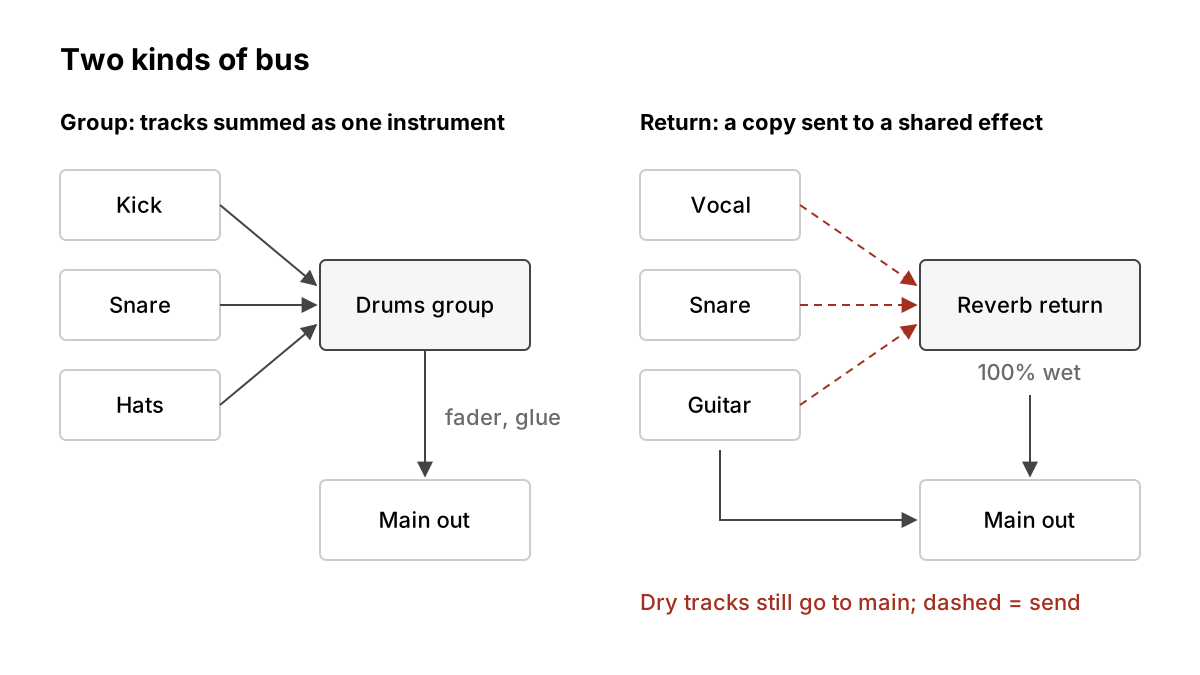
Groups (submixes). You route the whole output of several tracks into one channel, and that channel goes to the main output. Everything the drums play passes through the drum group. The Live 12 manual describes a Group Track as "a special kind of summing container": it cannot contain clips, but it has mixer controls and can host audio effects. When you group tracks, Live automatically points their outputs at the group unless they already had a custom routing.
Returns (aux or FX buses). Each track keeps its normal output, and you send a copy of some of its signal to a separate channel. The return's output is blended back in. The manual's point is that a track's own effect processes only that track, while a return "can process audio sent to them from numerous tracks". This is how one reverb serves the vocal, the snare and the guitar at once.
The rule of thumb: use a group when you want to treat several tracks as one instrument (level, tone, dynamics). Use a return when you want to add a shared effect alongside the dry signal (reverb, delay, parallel compression).
A starting layout
Most mixes need no more than this:
- Drums group: kick, snare, hats, percussion, room mics.
- Bass group (if you have more than one bass layer, such as a sub and a mid bass).
- Music group: keys, guitars, pads, synths.
- Vocals group: lead and doubles; backing vocals can have their own group nested inside.
- Two or three returns: a short room reverb, a longer plate or hall, and a tempo-synced delay.
Colour-code the groups and fold them away. Live, for example, can assign a group's colour to all the tracks and clips inside it, and you can nest one group inside another. A session laid out like this reads at a glance, which matters more than any plug-in when you come back to it a week later.
What to put on a group
Start with nothing. A group with no processing is already useful because one fader now moves the whole drum kit, and you can automate that one fader instead of eight. Add processing only when you can name the problem it solves.
Glue compression. A gentle compressor on the drum or music group makes separate parts move together. Typical starting points: a low ratio (around 2:1), a slow-ish attack so transients pass, a release timed to the groove, and no more than 1 to 3 dB of gain reduction on the loudest hits. If you can clearly hear it pumping and did not mean to, back it off.
Broad EQ. Group EQ is for wide strokes: a high-pass on the music group to clear room for the bass, or a gentle shelf to brighten the drum kit as a whole. Surgical cuts belong on the individual track that causes the problem.
Saturation. A little saturation on a group thickens parts in a way that sounds like they were recorded together. Keep it subtle and level-match before you judge it.
Sends and returns in practice
On each track, a send knob sets how much signal goes to each return. Put the effect on the return at 100% wet, because the dry sound is still coming through the track itself. Then:
- Reverb: send a little of everything that should share a space. A common trick is to high-pass and low-pass the reverb return so it does not muddy the low end or sizzle in the top.
- Delay: send the vocal throws, a snare hit or a lead line. Automate the send rather than the delay plug-in, so throws arrive only where you want them.
- Parallel compression: put a heavy compressor on a return and send the drums to it. Blend the squashed version under the natural kit with the return fader.
Pre or post fader. The manual notes that every Live return has a Pre/Post toggle deciding whether the send is taken before or after the track's mixer stage. Post-fader (the usual choice for effects) means turning a track down also turns down its reverb, so the wet-to-dry balance stays the same. Pre-fader sends ignore the track fader; the manual says this lets you build "an auxiliary mix" independent of the main one, which is what you want for a headphone cue mix or for a reverb that should remain when the dry part fades out.
Common mistakes
Compressing every bus and the master. Each compressor in the chain reacts to the one before it. Stack four and your mix stops breathing. Pick one or two places where glue genuinely helps.
Fixing track problems on the bus. If the snare is harsh, EQ the snare. Cutting harshness on the drum group also dulls the hats and cymbals.
Clipping the group. Ten tracks summed into one channel can run hot. Watch the group meter, and stage your gain so the group fader sits near unity with headroom to spare.
Losing track of routing. A track that should feed the drum group but goes straight to the main output will dodge your bus compressor. Live's manual also points out that a group can be used purely as a "folder" by rerouting its tracks elsewhere, which is handy but easy to forget. When something sounds wrong, check the output chooser first.
Sidechain sources on the wrong side. If you are sidechaining a bass group from the kick, take the kick from its own track, not from the drum group, or the compressor will also react to everything else in the kit.
A short checklist
- Group tracks by role: drums, bass, music, vocals.
- Set up two or three returns for shared reverb and delay, effects at 100% wet.
- Leave groups unprocessed until you can name a problem.
- Keep glue compression light: low ratio, a few dB at most.
- Use post-fader sends for effects, pre-fader for cue mixes.
- Check group meters and output routing whenever something sounds off.
What we think
Most beginner advice treats bus processing as the place where a mix gets its polish: a glue compressor here, a tape plug-in there. We think that has it backwards. The main value of groups is not processing at all, it is decisions. Collapsing forty tracks into five faders forces you to hear the mix as the listener does, as drums, bass, music and voice, and to balance those first. Most bedroom mixes we hear that feel "unglued" have a balance problem between groups, not a missing compressor on them.
So our advice is the opposite of the usual plug-in chain: build the groups, mix with only the group faders for ten minutes, and only then ask whether any bus needs processing. Often none of them do. When one does, you will know exactly why, and a single, light compressor will do more than four habitual ones. Treat the bus as a steering wheel before you treat it as an effect.
Sources
- Live 12 Manual: Mixing, Ableton (primary source). Accessed 25 Oct 2026.
Researched with AI assistance, written and checked by WATMM Desk.