Learn — By WATMM Desk —
EQ basics: cutting vs boosting, the six filter shapes, and the frequency problems you will actually meet
Equalisation (EQ) turns frequency ranges up or down. This guide explains subtractive and additive EQ, the six filter shapes most plug-ins share, and where the usual problems (rumble, mud, boxiness, harshness) tend to sit, with the caveat that every range is a starting point for your ears, not a rule.
Key facts
- Ableton's EQ Eight manual lists six filter responses per band: low cut, low shelf, peak, notch, high shelf and high cut, with the cut filters at 12 or 48 dB per octave.
- Sound On Sound's Mike Senior calls the high-pass filter his most common EQ choice and says DAW EQ plug-ins tend to sound better cutting than boosting (Nov 2008).
- Waves argues neither cutting nor boosting is inherently right or wrong, and that narrow (high-Q) boosts tend to sound over-focused and unnatural (Apr 2018).
- iZotope's EQ cheat sheet places kick and piano mud around 200 to 500 Hz and vocal harshness around 5 to 8 kHz (Aug 2023).
EQ (equalisation) does one thing: it turns a range of frequencies up or down. Waves puts it plainly in its boost-or-cut explainer: these tools "only have two functions", adding more of a set of frequencies or reducing it. Everything else, from the shape of the curve to how wide it is, is detail on top of that.
This guide covers the two approaches (subtractive and additive), the filter shapes you will find on almost any EQ, and where the common problems tend to live. If you have not yet sorted your levels, read gain staging in a floating-point DAW first; if your room is lying to you, no EQ setting will be right, and our budget acoustic treatment guide is the better place to start.
What is subtractive vs additive EQ?
Subtractive EQ means cutting: taking out frequencies that are getting in the way. Additive EQ means boosting: bringing up a range to make something brighter, fuller or more present.
The forum rule is "cut, don't boost". The sources we checked are more nuanced than that.
- In a Sound On Sound reader Q&A from November 2008, Mike Senior says the EQ plug-ins built into sequencers "tend to sound better cutting than boosting", and that boosting to bring out an instrument's characteristic range "will probably do you more harm than good" when a mix is muddy.
- Waves, by contrast, says "neither option is inherently right, nor inherently wrong", and that the choice is about "which approach makes the most sense at the time".
Both agree on the shape of the move. Waves says that "boosting a frequency with a high Q value tends to create an over-focused, unnatural sound", while lower-Q boosts sound gentler, and that a narrow cut can remove a problem without making a track sound hollow. So the practical version is: cut narrow to fix, boost wide to flavour.
Senior also gives a useful test for any cut. If bypassing the EQ does not take away anything you care about, keep the cut.
What does Q mean?
Q is the width of a band. Ableton's EQ Eight manual calls it "Q (also called resonance or bandwidth)". A high Q affects a narrow slice of frequencies; a low Q affects a wide one.
Some EQs link Q to gain. EQ Eight's Adaptive Q option means "the Q amount increases as the amount of boost or cut increases", which Ableton says is modelled on classic analogue EQs and keeps the output level more consistent.
Waves adds a point that trips up beginners: the frequency scale is not linear. On a typical EQ display, 100 Hz to 200 Hz takes up about the same space as 5 kHz to 10 kHz, so a band that looks narrow at the top end can still cover thousands of hertz.
What are the main filter types?
Most EQs share the same six shapes. Ableton's EQ Eight manual lists them for every band, and the names below are the common ones.
| Filter | What it does | Typical use |
|---|---|---|
| Low cut (high-pass) | Removes everything below a set frequency. EQ Eight offers 12 or 48 dB per octave slopes. | Clearing rumble and low-end build-up from parts that do not need it |
| Low shelf | Boosts or cuts everything below a set frequency by a fixed amount | Gently taming or adding weight without removing the bottom entirely |
| Peak (bell) | Boosts or cuts a range around a centre frequency; Q sets the width | Most corrective and tonal moves |
| Notch | Cuts a very narrow range sharply | Single technical problems such as hum or a ringing drum |
| High shelf | Boosts or cuts everything above a set frequency | Adding "air" or softening brightness |
| High cut (low-pass) | Removes everything above a set frequency, again at 12 or 48 dB per octave in EQ Eight | Pushing a part back, or removing hiss and fizz |
The naming is confusing at first: a low cut is the same thing as a high-pass filter, because it lets the highs pass. The slope (dB per octave) tells you how steeply it cuts: a 12 dB slope is gentle, a 48 dB slope is close to a wall.
Senior says the high-pass is his "most common EQ choice", though not always needed, because "low frequencies tend to use the majority of the mix headroom". He also notes that a low shelf "might do a more musical job" in some cases, which is worth trying when a high-pass makes a part sound thin. And he keeps very narrow notches for specific technical problems, such as mains hum or drum resonances, rather than general mud.
EQ Eight also offers mid/side (M/S) and left/right modes, which give separate curves for the centre and sides of a stereo signal, or for each channel. These are useful later; for basics, stay in stereo.
Where do the common problems usually sit?
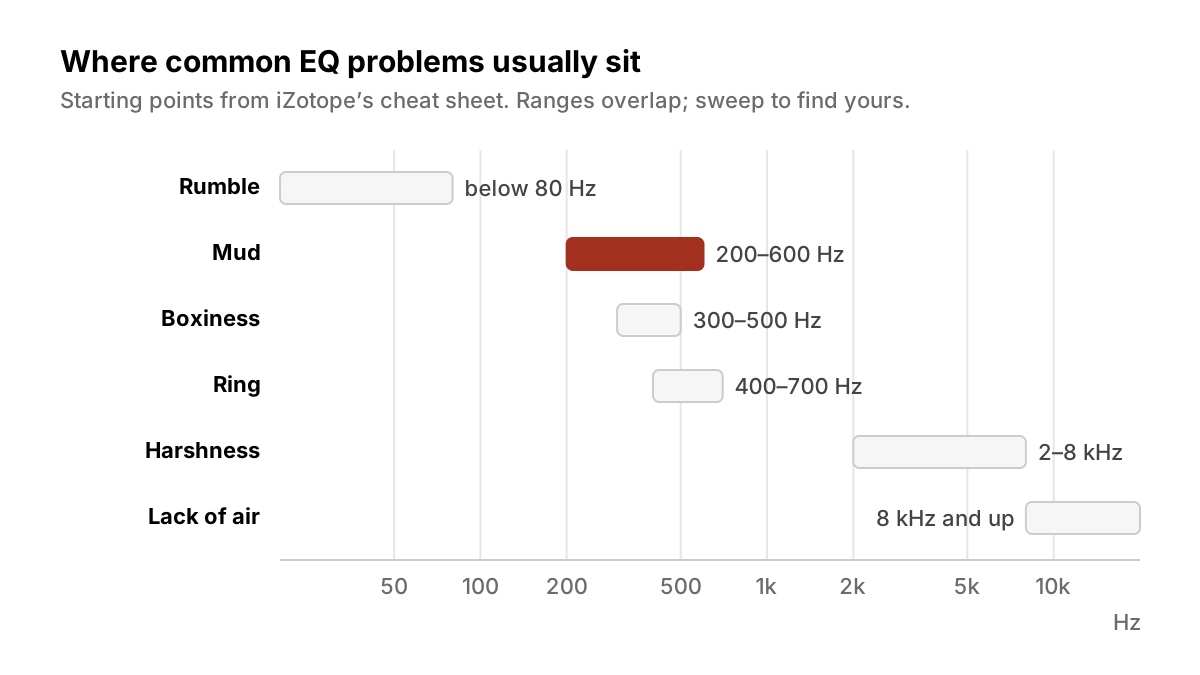
These ranges come from iZotope's EQ cheat sheet by Nick Messitte (Aug 2023), which lists them by instrument. They overlap and differ between sources, so treat them as places to start looking.
| Problem | What it sounds like | Where iZotope suggests looking |
|---|---|---|
| Rumble | Low, unfocused energy you feel more than hear | Below 80 Hz on snare; around 40 Hz on room mics. Usually handled with a high-pass. |
| Mud | Thick, cloudy, parts blurring together | 200 to 500 Hz on kick and piano; roughly 250 to 600 Hz on toms; below 500 Hz on effect returns |
| Boxiness | Hollow, cardboard, "in a small room" | 300 to 500 Hz on snare; 400 to 500 Hz on room mics |
| Ring | A single sustained tone that hangs on | 400 to 700 Hz, narrow band, on snare |
| Harshness | Edgy, tiring, painful at volume | 2 to 4 kHz on piano; 3 to 7 kHz on hi-hats; around 4 kHz on cymbals; 5 to 8 kHz on vocals |
| Lack of air | Dull, closed-in top end | 8 to 12 kHz on overheads; 10 kHz and above on vocals and strings, often with a gentle shelf |
Messitte's broad rules match Senior's. He says "less is always more", recommends "a gentle, broad cut" for mud on piano and effect returns, and warns, on bass, that "if you have to start by boosting, you're probably in trouble".
A simple order of work
- Balance first. Get levels and panning right before you touch EQ. Senior suggests building the mix "in order of importance", adding each part and checking whether it hides anything more important.
- High-pass what does not need the low end. Bring the filter up until you hear the part change, then back it off. Try a low shelf if it sounds thin.
- Find problems by ear, then cut. A quick narrow boost swept through a range will make a resonance jump out; then turn it into a cut. Keep the sweep short, because a big boost tires your ears.
- Boost last, and wide. If something still needs more presence or air, use a low-Q bell or a shelf.
- Bypass and compare. Use Senior's test, and match levels when you compare.
For the listening tests that catch the wider problems (too much bass, a muddy low end, mixing without a reference), see ten bedroom mix mistakes.
What we think
Frequency charts are useful and also a trap. The same "mud" band moves by a hundred hertz or more between instruments and between sources, which is the point: there is no correct number, only your track. We would rather an artist learn three moves well (a high-pass, a narrow sweep-and-cut, and a wide gentle boost) than memorise a poster.
We also think "cut, don't boost" is better read as "fix before you flavour". Cutting is safer because it removes what is in the way, but a mix made only of cuts can end up polite and lifeless. Your sound is the bit you choose to add. Make the space first, then commit to the character, and trust what you hear on bypass over what the curve looks like on screen.
FAQ
Should I always cut instead of boost? No. Sound On Sound's Senior leans towards cuts in DAW EQs, but Waves argues neither is inherently right. Cut narrow to fix problems, and boost wide when something needs more character.
What is the difference between a low cut and a high-pass filter? Nothing. They are two names for the same filter: it cuts the lows and lets the highs pass.
What slope should my high-pass use? It depends on the part. Ableton's EQ Eight offers 12 dB per octave (gentle) and 48 dB per octave (steep); start gentle and go steeper only if low energy is still getting through.
Where is mud usually? iZotope's cheat sheet places it roughly between 200 and 600 Hz depending on the instrument. Sweep to find it on your track rather than cutting a fixed number.
What is Q? The width of an EQ band. High Q is narrow, low Q is wide.
Updated 24 Oct 2026.
Sources
- Live Audio Effect Reference: EQ Eight, Ableton (primary source). Accessed 24 Oct 2026.
- Q. What should I EQ to improve my muddy mixes?, Sound On Sound. Accessed 24 Oct 2026.
- EQ Tips: Boost or Cut the Frequencies?, Waves Audio. Accessed 24 Oct 2026.
- EQ Cheat Sheet: the Guide for Sculpting Your Sound, iZotope. Accessed 24 Oct 2026.
Researched with AI assistance, written and checked by WATMM Desk.