Learn — By WATMM Desk —
Sidechain compression beyond EDM pumping: ducking, key inputs and multiband sidechains
A sidechain lets one sound control how a processor treats another. Pumping kick-and-bass is the famous use, but the same routing quietly ducks guitars under a vocal, keys a gate from a drum, and, with a multiband compressor, turns down only the frequencies that clash. Here is how each version works, using the Ableton Live manual and FabFilter Pro-MB help as references.
Key facts
- Trigger, not audio: Ableton says a Compressor sidechain source acts as the trigger "instead of the signal that is actually being compressed", and that the sidechain audio "is never actually heard."
- Frequency-selective triggers: Ableton's sidechain EQ makes the compressor "triggered by a specific band of frequencies, instead of a complete signal."
- Keyed gates both ways: Ableton's Gate can take another track as its trigger, and its Flip mode passes signal "only ... if its level is below the threshold."
- Multiband sidechain: FabFilter Pro-MB bands can switch between internal and external side chain input, and trigger from a freely chosen frequency range.
Say "sidechain" to most producers and they hear the kick punching a hole in a pad four times a bar. That sound is real and it is useful, but it is one setting of a much more general tool. A sidechain simply lets one signal decide what a processor does to another. Once that clicks, you can use it for things nobody will ever notice, which is usually the point.
This guide covers the routing, then four uses beyond the pump: ducking, keyed gates, frequency-selective triggers and multiband sidechaining. We use the Ableton Live manual and FabFilter's Pro-MB help as references because both describe the controls plainly; most DAWs and plug-ins have equivalents with different names. If threshold, ratio, attack and release are new to you, start with our compressor controls explainer and come back.
What is a sidechain, exactly?
Every compressor has a detector: the part that listens and decides when to turn the level down. Normally it listens to the same audio it is processing. A sidechain swaps what the detector hears.
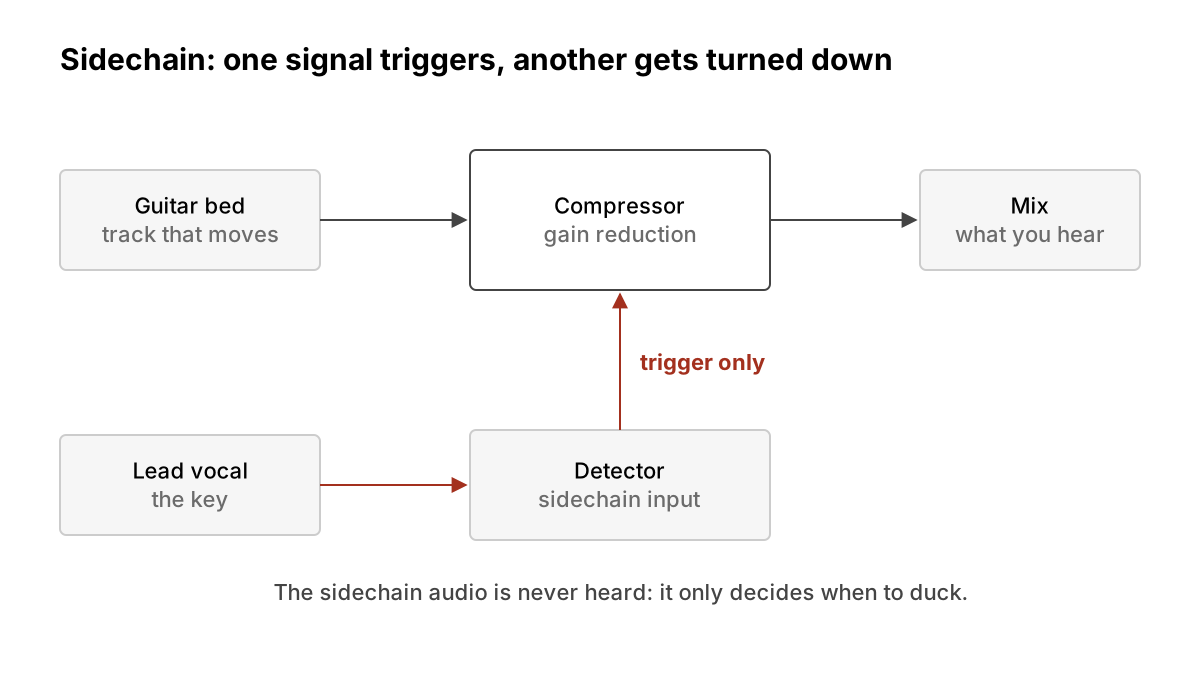
Ableton's manual puts it well. Enabling the Compressor's sidechain lets you "select any of Live's internal routing points", and that source then acts "as the compressor's trigger, instead of the signal that is actually being compressed." The manual is also clear that "the sidechain audio is only a trigger for the compressor and is never actually heard." So routing a vocal into a guitar compressor's sidechain does not add the vocal to the guitar track. It only lets the vocal push the guitar down.
Two other details from the same page matter in practice:
- Dry/Wet in the sidechain section sets the mix of sidechain and original signal used as the trigger, so the compressor can respond partly to itself and partly to the key.
- The Listen button (headphones icon) "allows you to listen to only the sidechain input", which is the fastest way to check you have routed the right thing.
Ableton also notes that automatic makeup gain is not available with an external sidechain, so set output gain by ear.
Use 1: ducking without the pump
Ducking means turning one part down while another plays. The classic case outside dance music is a busy guitar, synth or piano bed that crowds the lead vocal. Put a compressor on the bed, key it from the vocal, and the bed dips only while someone is singing.
The difference from the EDM pump is all in the settings, not the routing. Pumping uses deep gain reduction and a release timed to the beat so you hear the level swell back. Transparent ducking uses a low ratio, only a dB or two of gain reduction, and a release slow enough that the bed recovers between phrases rather than between syllables. We are not giving fixed numbers here because the right values depend on the tempo and the parts; watch the gain-reduction meter and listen for the moment the move becomes audible, then back off.
The same trick works for podcast-style voiceover over a music bed, for a lead synth over arpeggios, or for a reverb return keyed from the dry vocal, so the tail blooms in the gaps instead of smearing the words. (Our reverb and delay guide covers the send setup that last one assumes.)
Use 2: keyed gates, open and closed
Compressors are not the only processors with a key input. Ableton's Gate has its own sidechain section: enable it and you can "select another track", whose signal then triggers the gate instead of the gated signal itself.
That gives two families of tricks:
- Gate opens on the key. A sustained pad or noise layer only passes when a drum hits, which turns a held chord into a rhythmic part that locks to the groove, or adds a burst of noise to thicken a snare without a constant hiss.
- Gate closes on the key. Ableton's Flip button makes the gate work "in reverse; the signal will only pass if its level is below the threshold." Keyed from another part, that is a hard duck: the gated track drops out entirely whenever the key is loud.
As with the compressor, a Dry/Wet control sets how much of the gate's own signal also contributes to the trigger.
Use 3: listen to only part of the key
A full-range trigger is often the wrong one. A bass guitar's low notes might trip a bus compressor that should be reacting to the snare, or a vocal's breaths might trigger a duck you only wanted on the words.
Ableton's sidechain EQ addresses this: with it on, the compressor is "triggered by a specific band of frequencies, instead of a complete signal." Filter the detector and the compressor reacts to what you care about. Two common uses follow from that one control:
- Stop a mix-bus compressor overreacting to the low end by cutting lows in the detector, so the kick and bass stop driving every gain change.
- Make a de-esser-style compressor by boosting or band-passing the harsh, high "s" range in the detector, so the whole vocal dips only when sibilance spikes.
Note that this changes what the compressor hears, not what it processes: the full signal still gets turned down. For frequency-specific gain reduction you need the next tool.
Use 4: multiband sidechain, ducking only what clashes
A plain duck turns the whole guitar down under the vocal, including the low body and the airy top that never competed with the voice. A multiband compressor with an external sidechain can duck only the band that clashes.
FabFilter's Pro-MB shows how this is exposed. In its expert band controls, the In/Ext buttons "choose between the internal, normal plug-in input, or the external side chain input," per band. Its Band/Free buttons set the trigger range: "either the band input signal itself" or "a freely chosen range anywhere in the spectrum," and Free mode reveals side-chain filtering controls. Sound On Sound's review gives the textbook example: set it up "to duck the mid-frequencies in your electric guitars when the vocals come in."
Ableton's Multiband Dynamics also has a sidechain section that lets you choose a routing point as the trigger, and the manual repeats that this audio is never heard.
The same idea applies wherever two parts fight over one range: keying the low band of a bass from the kick so only the sub dips on each hit, rather than the whole bass, or keying the presence range of a pad from a lead.
How to set one up (any DAW)
- Put the processor on the track that should move (the guitar, pad or bass), not on the trigger.
- Route the trigger to its sidechain input. In Ableton this is the chooser in the device's sidechain section; in other hosts it is often a "side chain" or "key" selector in the plug-in header. Sends to the key input usually work too.
- Solo the key with the listen control to confirm the routing.
- Set the threshold so gain reduction happens only when the trigger plays, then shape attack and release to taste.
- Filter the detector, or switch to a multiband band, if the move is too broad.
- A/B at the mix's real level. A subtle duck that sounds like nothing soloed can be the reason the vocal sits in context.
What we think
Sidechaining got branded as a genre effect, and that undersells it. Its most valuable uses are invisible: a vocal that stays clear without being turned up, a bass that makes room for the kick without losing its weight. That is arrangement-level thinking done with a router, and it rewards producers who listen to how parts interact rather than how each one sounds alone.
We would also nudge people away from reaching for an "auto-ducking" preset or a one-knob volume-shaper plug-in as a first move. They can be great, but they hide the one decision that matters, which is what should yield to what, and when. Setting a key input by hand once teaches you that. And when an automatic mixing tool suggests ducking, it is worth knowing what it is actually doing so you can decide whether the part it turned down deserved to lose that fight. The artist's arrangement, not the plug-in, should make that call.
FAQ
Does the sidechain signal get added to my track? No. Ableton says the sidechain audio "is only a trigger ... and is never actually heard."
What is the difference between sidechain EQ and multiband sidechaining? Sidechain EQ filters what the detector hears, but the whole signal is still turned down. A multiband sidechain turns down only the band you choose.
Can a gate use a sidechain? Yes. Ableton's Gate can take another track as its trigger, and Flip mode makes it pass signal only below the threshold.
Is ducking the same as pumping? Same routing, different settings: pumping is deep and timed to be heard, ducking is shallow and meant to go unnoticed.
Sources
- Ableton, Live Audio Effect Reference (Compressor, Gate and Multiband Dynamics sections), accessed 24 Oct 2026.
- FabFilter, Pro-MB help: Expert band controls, accessed 24 Oct 2026.
- Sound On Sound, FabFilter Pro-MB review, accessed 24 Oct 2026.
Updated 24 Oct 2026.
Sources
- Live Audio Effect Reference (Compressor, Gate, Multiband Dynamics), Ableton (primary source). Accessed 24 Oct 2026.
- FabFilter Pro-MB help: Expert band controls, FabFilter (primary source). Accessed 24 Oct 2026.
- FabFilter Pro-MB review, Sound On Sound. Accessed 24 Oct 2026.
Researched with AI assistance, written and checked by WATMM Desk.