Learn — By WATMM Desk —
Compressor controls explained: threshold, ratio, attack, release and when to reach for each
A compressor turns loud parts down once they cross a level you choose. Threshold and ratio decide how much, attack and release decide how fast, and knee, makeup, dry/wet and sidechain shape the rest. Here is what each control does, using the Ableton Live manual as the reference, and when each one is worth touching.
Key facts
- Threshold sets where compression begins; a ratio of 1 means no compression, regardless of the threshold (Ableton Live manual).
- Attack is how long it takes to reach maximum compression once the signal crosses the threshold; release is how long it takes to return to normal after it falls below.
- Peak detection reacts to short peaks; RMS detection is closer to how people perceive loudness, according to the Ableton Live manual.
- Dry/Wet blends compressed and uncompressed signal, which lets you do parallel compression on one insert (Ableton Live manual).
A compressor is an automatic volume control. Once a signal gets louder than a level you set, it turns that signal down by an amount you set, at a speed you set. Every knob on the front panel is a variation on those three ideas: how loud, how much, how fast.
This guide walks through the standard controls, using the Ableton Live manual's Compressor section as our reference because it is public, precise and describes a compressor most producers can open. Names differ slightly between plug-ins, but the ideas carry over to almost any compressor in any DAW. Before you compress anything, it helps to have sensible levels going in; our guide to gain staging in a floating-point DAW covers that.
What does a compressor actually do?
It reduces dynamic range, the gap between the quiet and loud parts of a sound. It does this by only acting on the parts that cross a line. Below that line, nothing happens. Above it, the level is pulled down. Then you usually turn the whole thing back up, so the quiet parts end up louder relative to where they started and the performance sits more evenly in the mix.
That is the whole trick. Everything else is about how the compressor decides what "too loud" means and how quickly it reacts.
Threshold: where does compression start?
In Ableton's words, "the Threshold slider sets where compression begins." Signal below the threshold passes untouched. Lower the threshold and more of the material gets compressed; raise it and only the loudest peaks are caught.
When to touch it: first, almost always. Start with the threshold high, then lower it while watching the gain-reduction meter until it moves on the parts you want controlled, such as the loud syllables in a vocal, and stays still on the rest.
Ratio: how much does it turn down?
Ratio sets how hard the compressor pushes back above the threshold. The manual notes that "a ratio of 1 means no compression, regardless of the threshold." The arithmetic is simple: at 4:1, a signal that goes 8 dB over the threshold comes out 2 dB over it. At 2:1 the same signal comes out 4 dB over. Very high ratios behave like a limiter, holding the signal close to the threshold.
When to touch it: low ratios (around 2:1) for gentle evening-out of a whole mix or a bus; higher ratios when you want a part pinned in place, like a bass that has to sit at one level. These are starting points, not rules. Threshold and ratio work together: a low threshold with a gentle ratio and a high threshold with a steep ratio can both give similar amounts of gain reduction, but they sound different because they act on different parts of the signal.
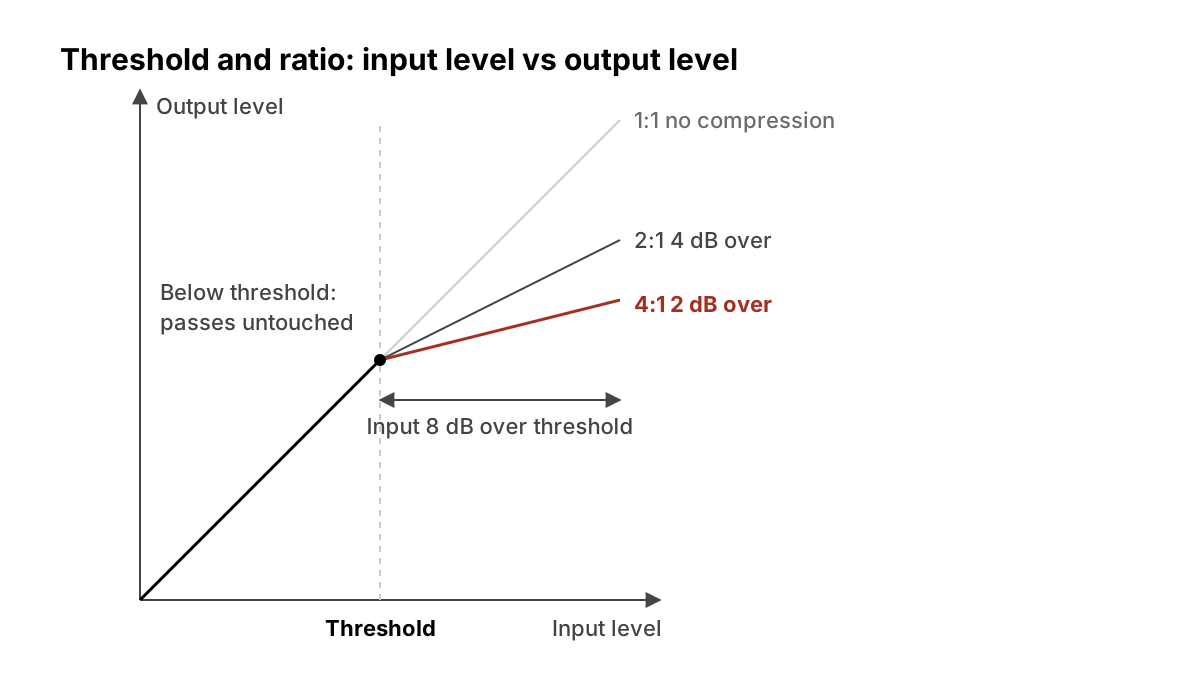
Attack: how fast does it grab?
The manual defines attack as "how long it takes to reach maximum compression once a signal exceeds the threshold."
This is the control that changes the character of a sound most. A fast attack clamps down on the very start of a note, the transient (the short burst at the start of a drum hit or a plucked string), and can make drums sound smaller or softer. A slower attack lets that initial burst through before the compressor reacts, which can make a snare or kick sound punchier, because the transient now stands out against a controlled body.
When to touch it: slow it down when compression is making drums or plucked parts sound dull; speed it up when sharp peaks are still jumping out after compression.
Release: how fast does it let go?
Release "sets how long it takes for the compressor to return to normal operation after the signal falls below the threshold." Too short and you can hear the level pumping up and down with every note. Too long and the compressor never recovers between hits, so it stays turned down and squashes everything after the first loud moment.
Ableton's Compressor also has an Auto Release option: "the release time will adjust automatically based on the incoming audio." Many other compressors have a similar automatic mode.
When to touch it: set it so the gain-reduction meter falls back roughly in time with the music, recovering before the next beat or phrase. If you are not sure, an auto setting is a reasonable default.
Knee: sudden or gradual?
"The Knee control adjusts how gradually or abruptly compression occurs as the threshold is approached." With a hard knee the full ratio applies the instant the signal crosses the threshold; the manual warns that with very high ratios this "so-called 'hard knee' behavior can sound harsh." With a soft knee, "the compressor begins compressing gradually as the threshold is approached."
When to touch it: soften it for transparent control on vocals and buses; keep it hard when you want the compressor to grab obviously, as an effect.
Makeup gain: why does compression make things quieter?
Turning the loud parts down lowers the overall level, so compressors include a makeup (output) gain to bring it back up. In Ableton, enabling Makeup "automatically compensates the output level if the threshold and ratio settings change."
When to touch it: always match the compressed level to the bypassed level before judging. Louder nearly always sounds "better" for a few seconds, which is the easiest way to fool yourself into over-compressing.
Peak or RMS: what is the compressor listening to?
The detector decides how the compressor measures level. Per the manual, "with Peak selected, Compressor reacts to short peaks within a signal," while "RMS is closer to how people actually perceive loudness and is usually considered more musical." Peak mode suits catching fast transients and limiting; RMS suits smoothing out a performance.
Ableton also offers Lookahead times of zero, one and ten milliseconds, and notes that "the results may sound pretty different depending on this setting." Lookahead lets the compressor see a peak slightly before it arrives, which helps catch very fast transients.
Dry/Wet: what is parallel compression?
"Dry/Wet adjusts the balance between the compressed and uncompressed signals." Blending a heavily compressed copy with the untouched original is usually called parallel compression. You keep the natural attack of the dry signal and add the density of the compressed one. It used to need a separate bus; a mix knob does it on one insert.
When to touch it: on drums and vocals when heavy compression sounds exciting but lifeless on its own. Compress hard, then pull the mix back until the original's movement returns.
Sidechain: can something else trigger it?
Yes. Ableton's sidechain section lets you "select any of Live's internal routing points" as the trigger, so a kick drum can duck a bass or pad, the familiar pumping in dance music, or a vocal can gently push down a busy guitar. Sidechain EQ "causes the compressor to be triggered by a specific band of frequencies," which is useful when, say, low-end energy is making a whole-mix compressor overreact.
A starting workflow
- Set input levels sensibly first.
- Pick a ratio that suits the job: gentle for buses, firmer for single parts.
- Lower the threshold until the meter moves only on the parts you want tamed.
- Adjust attack for the transient you want, then release so the meter breathes with the tempo.
- Match the output level to bypass and A/B it. If you cannot hear an improvement at matched level, take it off.
- Reach for Dry/Wet or sidechain only when the plain insert is not doing the job.
What we think
Compression is the most over-taught and over-used tool in home mixing, and a big part of the reason is that it makes things louder before it makes them better. Most of the "my mix sounds flat" problems we see (and list in common bedroom mix mistakes) come from compressors used as a default rather than as a fix for something specific.
Our artist-first rule: compress to protect a performance, not to replace one. A singer's dynamics are part of what they are saying. If a line gets louder because they meant it, a compressor that flattens it has edited the emotion out. Use it when a part genuinely gets lost or jumps out, set it at matched level, and let the track breathe. Streaming platforms already turn loud masters down to a common level, as we explain in our streaming loudness targets guide, so squashing everything for volume buys you less than it used to.
And if a preset or an AI "assistant" suggests settings, treat them as a starting point you check with your ears, not a verdict.
FAQ
Should I put a compressor on every track? No. Use one where a part has a level problem you can name. Many tracks need none.
What is the difference between a compressor and a limiter? A limiter is essentially a compressor with a very high ratio and fast response, used to stop peaks going past a ceiling. A compressor at a moderate ratio shapes dynamics more gently.
How much gain reduction is normal? It depends on the source and the goal, so we will not give a number. Judge by ear at matched level, not by the meter.
Why does my mix pump? Usually the release is too short or too long for the tempo, or a loud low-frequency part is triggering a bus compressor. Adjust release, or use sidechain EQ to make the detector ignore the lows.
Sources
- Ableton, Live Audio Effect Reference: Compressor, accessed 24 Oct 2026.
Sources
- Live Audio Effect Reference: Compressor, Ableton (primary source). Accessed 24 Oct 2026.
Researched with AI assistance, written and checked by WATMM Desk.