Learn — By WATMM Desk —
Mid/side processing: what it is, why mono still matters, and where it helps in mixing and mastering
Mid/side (M/S) is another way to describe a stereo signal: the sum of left and right (mid) and their difference (side). This guide explains the maths in plain words, why everything you do to the side channel vanishes in mono, and the handful of mixing and mastering moves where M/S earns its place.
Key facts
- iZotope defines Mid as Left + Right and Side as Left - Right, and decodes with Left = Mid + Side and Right = Mid - Side (Ian Stewart, Aug 2025).
- iZotope warns that processing applied only to the side channel "will disappear completely in mono".
- Ableton Live's EQ Eight offers Stereo, L/R and M/S modes, and its Utility device has a Bass Mono switch with a cutoff from 50 to 500 Hz.
- Sonarworks warns that misused M/S processing can "dramatically alter a mix" and, at worst, cause phase issues (Dec 2020).
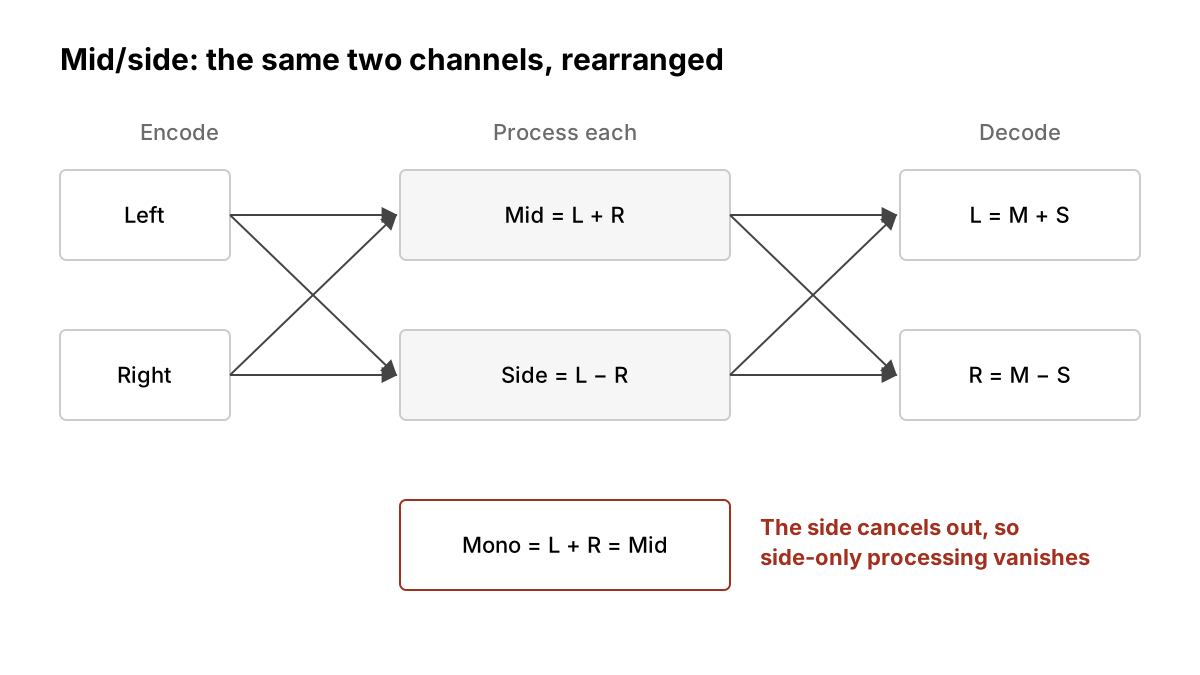
Every stereo file you have ever bounced has two channels, left and right. Mid/side, usually written M/S, is a different way of describing exactly the same two channels. Nothing is added or lost; the information is just rearranged so you can reach parts of the stereo image that left and right controls cannot reach on their own.
That makes it one of the most useful tools in a mix, and one of the easiest to overdo. This guide covers what M/S actually is, why it ties directly to mono playback, and the few jobs it is genuinely good at. If you are new to the tools it is usually paired with, start with our EQ basics and compression basics guides.
What mid and side actually are
iZotope's Ian Stewart describes mid/side as "an alternative way of using two channels of audio to represent stereo information". The conversion is simple arithmetic:
- Mid (also called the sum) = Left + Right
- Side (also called the difference) = Left − Right
To get back to normal stereo, you reverse it:
- Left = Mid + Side
- Right = Mid − Side
In practice, plug-ins also apply gain compensation during the encode or decode so levels come out where they went in, as Stewart notes. He also points out that "subtracting a signal really just means adding a polarity-inverted version", which is a useful way to picture it: the side channel is what is left when you cancel out everything the two speakers share.
So, roughly:
- Anything identical in both channels, such as a centre-panned kick, bass or lead vocal, lives in the mid.
- Anything that differs between the channels, such as hard-panned guitars, stereo reverb tails, wide synth pads and room ambience, contributes to the side.
A sound panned partly to one side shows up in both, which is why M/S is better thought of as "shared versus different" than "centre versus edges".
M/S is a microphone technique as well as a processing one: Ableton's manual says its EQ Eight M/S mode provides the same functionality "for signals that have been recorded using M/S encoding". This guide sticks to processing an ordinary stereo mix.
Why mono compatibility is the whole story
Here is the single fact that should shape every M/S decision you make. When a stereo track is summed to mono, left and right are added together. That is the mid channel. The side channel, by definition, cancels out.
Stewart puts it bluntly: if you process only the side channel, "the effect will disappear completely in mono". He also warns that "adding too much side channel content to a sound can have negative implications in mono".
What that means in practice:
- Width you add in the side channel is invisible to a mono listener. If a hook or a pad only exists because you boosted the sides, a mono listener loses it.
- Over-widening can bury the centre. Stewart notes that pushing the sides too far can push down centre-panned elements like the lead vocal, and that mono translation may suffer.
- Checking is cheap. Ableton's Utility device has a Mono switch, and its Width control goes from 0%, which the manual says "yields a mono signal", to above 100% for a widened image. Put one on your master bus and flip it often.
You do not need to guess how many of your listeners hear in mono. You only need to accept that some of your listeners may hear a mono sum, and your song should still work for them.
Where M/S helps in mixing
Most M/S work in a mix comes down to three moves.
1. Keeping the low end in the middle. Bass and kick usually sit best centred, and stereo low end can make a mix feel loose. Ableton's Utility has a dedicated Bass Mono switch that converts the low frequencies of the input to mono, with a cutoff adjustable from 50 to 500 Hz. A high-pass filter on the side channel of an M/S EQ does a similar job. Set it by ear, starting low.
2. Making room for the vocal. If a wide synth or guitar bed is fighting the lead vocal, you can sometimes dip the clashing range in the mid channel of that bed only, leaving its edges intact. The vocal gets space in the centre without the instrument losing its width. Stewart frames M/S EQ this way, as "frequency-based width manipulation", rather than as two separate EQs.
3. Adjusting width on a single source. Utility's Mid/Side mode, the manual says, "acts as a continuous mono to stereo controller". Narrowing an overly wide stereo sample or room mic is often more useful than widening anything.
Ableton's EQ Eight lets you choose Stereo, L/R or M/S modes, and shows both curves at once so you can see what you are doing to each channel. Most modern EQs offer something similar.
Where M/S helps in mastering
In mastering, you usually have only the stereo mix, so M/S is one of the few ways to reach inside it. Sonarworks' Tiki Horea calls M/S EQ "far more precise than its stereo counterpart", and suggests two starting points:
- A low cut on the sides with a 12 dB slope and a corner frequency around 40 to 50 Hz, to tighten the low end.
- A low shelf dip on the side channel to reduce low-end mud "without affecting the center-panned elements".
Stewart adds that soloing mid and side is useful just for listening: it shows what the mix is actually made of. He also says he will "almost exclusively use linear phase EQ" in mastering, because an EQ that is not linear phase can shift mid and side differently and move sounds around in the stereo image.
Both writers are cautious. Horea warns that misuse "can dramatically alter a mix and, in the worst case, cause phase issues", and his rule of thumb is worth taping to your monitor: "Be sure your EQ improves the master and doesn't simply make it different." Stewart says M/S "isn't foolproof, and pitfalls abound".
If you are mastering for streaming, pair this with our guide to streaming loudness targets: widening and loudness both tempt you to push, and both are easy to overdo.
A short checklist
- Solo the mid and side channels before changing anything. Listen to what is there.
- Fix problems in the mix first. M/S on the master is a scalpel, not a rescue.
- Keep low end centred: Bass Mono, or a high-pass on the sides, set by ear.
- Make small moves. A dB or two on the sides changes a lot.
- Prefer linear phase EQ for M/S work on a full mix, as Stewart does.
- Check in mono after every M/S change, and again at the end.
- Bypass and compare at matched loudness. If it is only different, undo it.
What we think
Mid/side is a good tool sold with a bad promise. The promise, implied by a thousand "make your mix wider" thumbnails, is that width is a quality you add at the end. It mostly is not. Width comes from arrangement: different parts doing different things, panned with intent. M/S can reveal and shape that, but it cannot create it from a mix where everything plays the same thing in the middle.
We also think artists should treat the mono button as a creative check, not a technical chore. If your song's emotional centre, the vocal, the hook, the groove, lives in the mid channel, it survives every speaker your listener owns. If it lives in the sides, you have written a song for headphones and good monitors only. Sometimes that is the right call. Make it on purpose.
And if you hand your mix to a mastering engineer or an automated mastering service, ask whether M/S processing was used and listen to the result in mono yourself. It is your record. You should know what was done to its stereo image.
Everything above is as we read the sources on 24 Oct 2026. Plug-in features change; check your own tool's manual.
Sources
- Live Audio Effect Reference: EQ Eight and Utility, Ableton (primary source). Accessed 24 Oct 2026.
- What is mid/side processing?, iZotope (primary source). Accessed 24 Oct 2026.
- Pro Mastering Tips: Mid-Side EQ, Sonarworks. Accessed 24 Oct 2026.
Researched with AI assistance, written and checked by WATMM Desk.