Learn — By WATMM Desk —
What LUFS should you master to in 2026? What each streaming platform documents, and what is folklore
Most "streaming loudness target" charts mix official numbers with figures nobody at the platform ever published. We went back to each service's own pages on 24 Oct 2026. Spotify publishes a full spec, Apple and Amazon describe the method but no number, YouTube says normalisation-style processing is off for music, and for TIDAL and Deezer we found no current artist-facing page at all. Here is what is documented, what is reported, and a target plan you can defend.
Key facts
- Spotify is the only major service we checked that publishes a number: -14 LUFS (ITU 1770) on Normal, -11 on Loud and -19 on Quiet, with true peak at or below -1 dBTP, or below -2 dBTP for masters louder than -14 LUFS.
- Apple's Digital Masters guide and Amazon Music's help page both describe loudness normalisation but give no LUFS target. The common -16 LUFS figure for Apple comes from a 2022 report by mastering engineer Ian Shepherd, not from Apple.
- TIDAL's -14 LUFS album normalisation is documented in 2017 trade coverage quoting researcher Eelco Grimm, not on a current TIDAL artist page we could find; for Deezer we found no official page.
Search "what LUFS should I master to" and you get a chart: Spotify -14, Apple -16, YouTube -14, Amazon -14, TIDAL -14, Deezer -15. It looks official. Most of it isn't. We went back to each platform's own pages on 24 Oct 2026 and sorted every number into three piles: documented by the platform, reported by a credible third party, and folklore.
If you want the mechanics of how normalisation turns a loud master down, our explainer Loudness normalisation explained covers Spotify, Apple and YouTube in detail. This guide is the shorter, practical question: which numbers can you trust when you sign off a master, and what should you aim for?
The one-table answer
| Platform | Target the platform publishes | What it does document | Where the common number comes from |
|---|---|---|---|
| Spotify | -14 LUFS (Normal), -11 (Loud), -19 (Quiet) | True peak advice, album mode, players that don't normalise | Spotify for Artists |
| Apple Music | None | Sound Check method, album mode, 1 dB headroom advice | -16 LUFS: Ian Shepherd, 2022 |
| Amazon Music | None | A normalisation setting in the Android, iOS and FireOS apps | Not traceable to Amazon in our search |
| YouTube | None for music | Stable volume, which is off for music | Not traceable to Google in our search |
| TIDAL | None we could find | Nothing current we could find | -14 LUFS album normalisation: audioXpress, 2017 |
| Deezer | None we could find | Nothing we could find | Not traceable to Deezer in our search |
One platform publishes a full spec. The rest leave artists to fill the gap from blogs, forum posts and distributor FAQs.
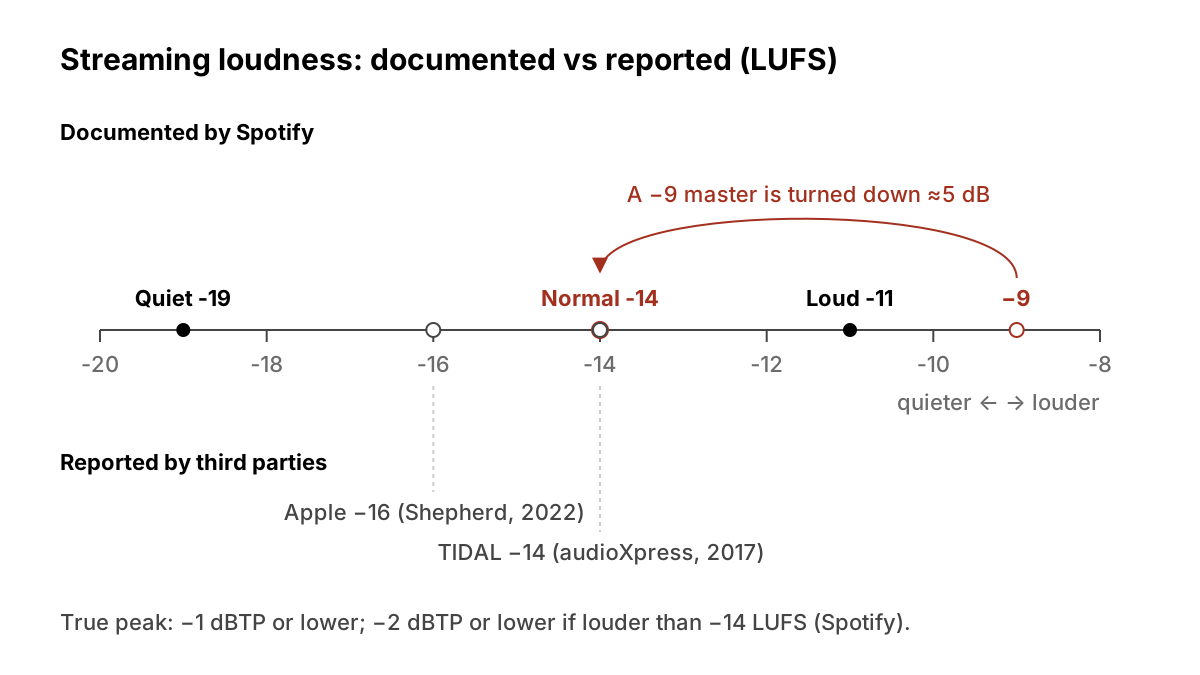
Spotify: the only full spec
Spotify's artist page is the reference everyone else gets measured against:
- Target. Tracks are adjusted to -14 dB LUFS, measured with the ITU 1770 standard, during playback. Your file isn't changed.
- Listener settings. Premium listeners can pick Loud (-11 LUFS), Normal (-14) or Quiet (-19). On Loud, a limiter engages at -1 dB.
- True peak. Keep it at or below -1 dBTP, which Spotify says suits lossy formats such as Ogg/Vorbis and AAC. If your master is louder than -14 LUFS integrated, keep true peak below -2 dBTP, because louder tracks are more prone to distortion when encoded.
- Albums. A full album is normalised as one unit, so the level relationships between tracks survive. In shuffle or a playlist, each track is adjusted on its own.
- Exceptions. The web player and third-party devices such as TVs and speakers don't normalise.
That last point matters more than it looks. Some of your listeners hear your master exactly as you delivered it.
Apple Music: the method, not the number
Apple's Digital Masters guide explains Sound Check clearly. It measures each track's loudness, stores the value as metadata and uses it to raise or lower playback volume, and it can work per album. Apple warns that very loud masters will play back quieter and can sound weaker, and recommends leaving at least 1 dB of headroom because oversampling at playback can clip a signal at 0 dBFS.
What the guide doesn't give is a LUFS target. The -16 LUFS figure on every chart traces back to mastering engineer Ian Shepherd, who reported in March 2022 that Apple had moved Sound Check to LUFS, was normalising to -16 LUFS and had switched Sound Check on by default for new installs. Shepherd is a well-informed source, but that is his measurement and reporting, not Apple's statement. Treat -16 as reported.
Amazon Music: a switch, no number
Amazon Music's help page says that with Loudness Normalization you can "play all songs at the same loudness level" in the Amazon Music apps for Android, iOS and FireOS. It gives no LUFS value. The page is written for listeners, so it says nothing about whether normalisation is on by default, how quiet tracks are handled or whether albums are treated as a unit. We couldn't trace the -14 LUFS figure you see in charts to Amazon itself.
YouTube: no music target
YouTube's Help Centre documents Stable volume, which is on by default and narrows the gap between quiet and loud passages. YouTube says the feature is turned off for YouTube Music and official music videos. We found no YouTube page that publishes a loudness target for music. Any number you see for YouTube is someone's measurement, not Google's spec.
TIDAL and Deezer: reported only
For TIDAL, the best-sourced account is from 2017. audioXpress reported that TIDAL adopted album normalisation, in which the loudest track on each album is set to -14 LUFS and the others keep their relative levels, and turned it on by default in its iOS and Android apps. The article quotes researcher Eelco Grimm, whose work informed the change. That is nine years old and second-hand. We found no current TIDAL artist page confirming it.
For Deezer, the -15 LUFS figure circulates widely, but we found no Deezer page stating it, so we've left it out of the table.
What to actually master to
Since only one platform publishes a spec, the defensible approach is to master against Spotify's numbers, leave margin for the platforms you can't verify, and let the music decide the rest.
- Pick the loudness that sounds best for the song. Normalisation means a louder master doesn't buy extra level on players that use it. On Spotify Normal, a master at -9 LUFS integrated is turned down by about 5 dB (our arithmetic: -9 minus -14).
- Measure integrated LUFS and true peak over the whole track on a meter that reports both.
- Set true peak to -1 dBTP or lower. If you've mastered louder than -14 LUFS, go to -2 dBTP or lower. That is Spotify's rule, and it also covers Apple's 1 dB headroom advice.
- If you're well under -14 LUFS, check the peaks. A very quiet master with hot peaks may not be lifted much on players that add positive gain.
- Sequence albums deliberately. Spotify and Apple both describe album-level normalisation, so the level differences you set between tracks can survive.
- Listen on a non-normalising player too. Spotify says its web player and many TVs and speakers don't normalise. That is where a quiet master still sounds quiet.
- Don't chase charts. If a target in a guide doesn't link to the platform's own page, treat it as an estimate.
Before delivery
- Integrated LUFS written down, with the Spotify offset for Normal, Loud and Quiet
- True peak at or below -1 dBTP, or -2 dBTP if louder than -14 LUFS
- Album levels checked in full-album playback
- One listen on a player with normalisation off
For how automated masters pick a loudness, see our look at AI mastering against an engineer.
What we think
The loudness chart is one of the most copied artefacts in music production, and most of it isn't sourced. That isn't the fault of the people who built it. Spotify aside, the platforms have chosen not to tell artists the one number that decides how their master is played back. In our view that is a strange gap for companies whose product is audio.
The practical result is good news for artists, though. Because the documented target (Spotify's -14) and the best-reported ones (Apple's -16, TIDAL's -14) sit within a couple of dB, you don't need a separate master per platform. One master with sensible true peak headroom, at whatever loudness serves the song, is the honest answer. The extra loudness from limiting harder mostly disappears on normalised players and remains only as lost dynamics.
Our ask to Apple, Amazon, YouTube, TIDAL and Deezer: publish your target, your peak-headroom rule and your album behaviour on one artist-facing page, with a date on it, the way Spotify does. Until then, we'll keep marking those numbers as reported, not official.
Sources
- Loudness normalization on Spotify, Spotify for Artists (primary source). Accessed 24 Oct 2026.
- Apple Digital Masters (technical guide, PDF), Apple (primary source). Accessed 24 Oct 2026.
- Turn On Loudness Normalization for Amazon Music Playback, Amazon Music Help (primary source). Accessed 24 Oct 2026.
- Control video volume on your device, YouTube Help (primary source). Accessed 24 Oct 2026.
- Apple Switches to LUFS, Enables Sound Check by Default, MeterPlugs (Ian Shepherd). Accessed 24 Oct 2026.
- Tidal Implements Album Loudness Normalization and Activates It by Default for Mobile Players, audioXpress. Accessed 24 Oct 2026.
Researched with AI assistance, written and checked by WATMM Desk.