Learn — By WATMM Desk —
A basic vocal chain: what goes in, in what order, and why
A vocal chain is the set of processors a dry vocal passes through before it reaches the mix. This guide walks through a common starting order (pitch correction, EQ, compression, de-essing, then delay and reverb), explains why each slot sits where it does, and says when to break the order. Based on iZotope and Sound On Sound guidance, read on 24 Oct 2026.
Key facts
- iZotope (Sep 2023) defines a vocal chain as a series of processors that dry vocals pass through before being added to the final mix.
- The same guide puts pitch correction first because it works best on a completely dry vocal, then EQ, then compression, then de-essing, then delay and reverb.
- Sound On Sound notes that EQ placed before a compressor can change how the compressor reacts, while EQ placed after it cannot.
Open any vocal preset and you will find the same handful of processors: something to fix pitch, an EQ, a compressor, a de-esser and some space. The tools matter less than the order you put them in, because each one hands its output to the next. This guide sets out a common starting order and, more usefully, the reason behind each slot, so you know when to break it.
iZotope's guide puts it simply: a vocal chain is "a series of processors" that your dry vocal runs through before it is added to the mix (iZotope). Everything below is a starting point, not a rule. The same guide says you can reorder or drop processors depending on genre and taste.
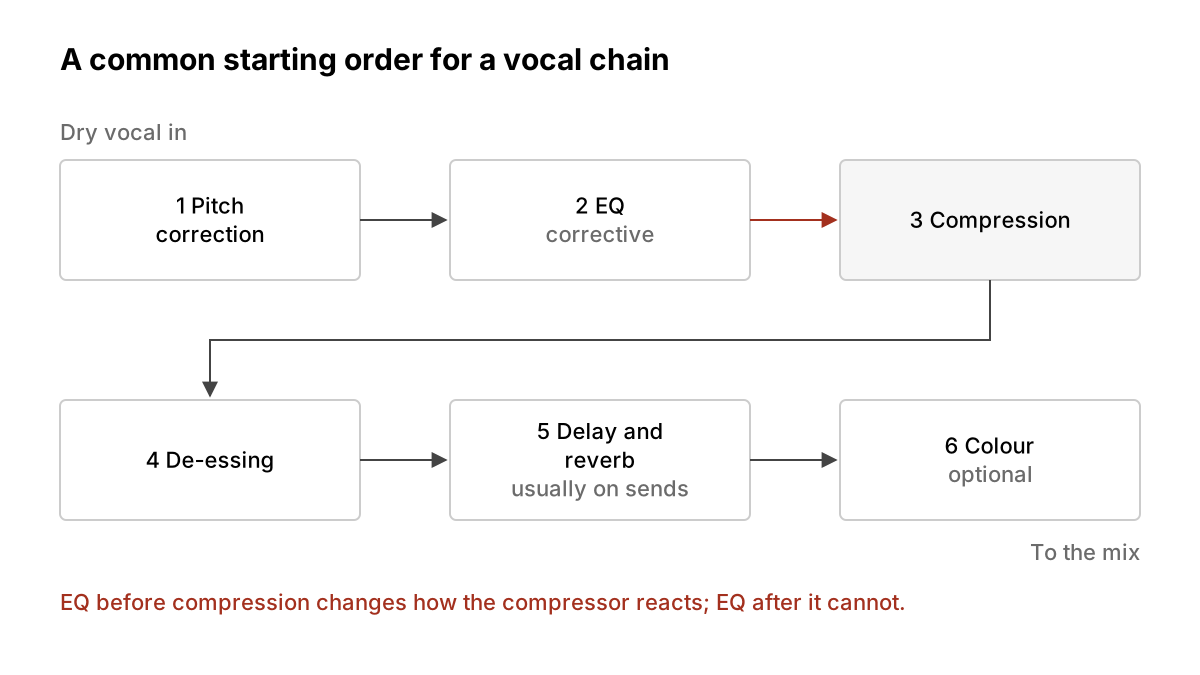
The order at a glance
- Pitch correction (if you use it)
- EQ (corrective)
- Compression
- De-essing
- Delay and reverb, usually on sends
- Optional colour: saturation or similar
1. Pitch correction first
iZotope's guide puts pitch correction at the very start because it "works best on a completely dry vocal". The reason is practical: a pitch tracker has an easier job reading a clean, single voice than one that already has reverb tails or heavy processing on it. If you are not tuning, skip the slot. If you are, our pitch correction basics covers how to keep it natural.
2. EQ before the compressor
Next comes EQ, used to clean up rather than to sweeten. iZotope describes this step as removing "overly resonant frequencies" so the vocal sits better in the mix.
Why before the compressor? Sound On Sound gives the clearest reason: "pre-compression EQ can alter the gain-reduction action of the compressor, but post-compression EQ won't" (Sound On Sound). If a vocal has low-frequency peaks, the magazine's example is thumps travelling up a mic stand, filtering those out before compression can make the compressor behave more predictably. Otherwise the compressor spends its effort reacting to noise you never wanted.
The same article also makes the counter-case: if the compression already sounds right, EQ placed after it lets you shape tone without changing how the compressor responds. Many engineers do both, a cleanup EQ before and a tonal EQ after. That split is a common habit rather than something either source prescribes, so treat it as an option. Our EQ basics guide explains the cuts and boosts themselves.
3. Compression to even out the performance
A sung line swings between quiet phrases and loud ones. The compressor narrows that range so the vocal stays present without riding the fader on every word. iZotope's guide says the compressor helps create "a more balanced version of the vocal", and that putting EQ before it "yields the best results for vocal mixing" in their approach. For attack, release and ratio, see our compression basics.
4. De-essing after the tone is set
Sibilance, the sharp "s" and "t" sounds, is the next problem. iZotope places the de-esser after EQ and compression, and its reason is about brightness: boosting the high end to make a vocal shine can also bring out sibilance, which the de-esser then tames. Putting it later in the chain means it works on the vocal as it will actually sound, not on a version you are about to change.
5. Delay and reverb last
Space goes at the end. iZotope lists delay before reverb, describes delay as adding "a sense of space within your mix", and warns that for clarity "less is more when it comes to reverb". It also notes that "the order the vocal chain effects are placed in can drastically change the final sound", which is most audible here: a reverb in front of a compressor will have its tail pumped and pulled up along with the voice.
A common way to run these is on send or aux tracks rather than directly on the vocal, so you can blend the effect and process it on its own. That is standard mixing practice; check your DAW's manual for how sends work in it.
6. Optional colour
iZotope mentions saturation and similar effects as optional extras at the end of the chain, for character. Use them by ear, and bypass them often to check they are helping.
When to break the order
- A clean, even take may need little compression. Do less.
- A dull vocal may want tonal EQ after the compressor, per the Sound On Sound counter-case above.
- Heavy sibilance before anything else? Try a de-esser earlier and compare. Your ears outrank any list.
If a mix still sounds muddy or harsh after this, our bedroom mix mistakes guide lists the usual causes.
What we think
The order matters less than knowing why each processor is where it is. A chain copied from a preset works until the vocal is different from the one the preset was built for, and then you are stuck. A chain you understand can be bent. If you remember one principle, make it this one from Sound On Sound: whatever comes before a compressor changes what the compressor does. Most chain decisions follow from that.
We also think beginners should build the chain one slot at a time, listening to each processor with the others bypassed, before trusting an AI assistant or a preset to do it. iZotope itself suggests its assistant as "a great starting point". We agree with the word "starting". A preset tells you what someone else liked on someone else's voice. Building the chain yourself teaches you what yours needs.
Sources
- Crafting a basic vocal chain, iZotope (primary source). Accessed 24 Oct 2026.
- Compression Made Easy, Sound On Sound (primary source). Accessed 24 Oct 2026.
Researched with AI assistance, written and checked by WATMM Desk.