Learn — By WATMM Desk —
How to prep stems and mixes for AI mixing and mastering services
Automated mixing and mastering services only hear what you upload. This guide pulls together what two of them, RoEx Automix and LANDR, actually ask for in their own help pages: lossless WAV, every stem starting at 0:00, honest labels, no limiter on the bus and real headroom. Then a pre-upload checklist and why we think the prep matters more than the service you pick.
Key facts
- RoEx Automix takes WAV only for mixing (44.1 or 48 kHz, 16- or 24-bit), up to 8 minutes, and 16 stems per mix (32 on Pro), per its help page read on 24 Oct 2026.
- RoEx asks that all stems start at 0:00 and that none are silent or very quiet; it says wrongly labelled stems hurt results and that hi-hats belong under Cymbals, not Drums.
- LANDR asks for a high-resolution WAV or AIFF at the session sample rate, peaks not much above -10 dBFS, and no limiters or aggressive compression on the master bus.
An automated mixing or mastering service makes its decisions from the files you hand it. It can't ask you which track is the lead vocal, whether that clipping is on purpose or why the bass starts two bars late. So the most useful work you can do happens before you press upload.
This guide is for artists sending their own songs to these services, whether you made every part yourself or some stems came out of a generator. It sticks to what two services say in their own help pages: RoEx Automix, which mixes from stems, and LANDR, which masters a finished mix. Other services will differ, so read their upload pages too. Everything here is as we read it on 24 Oct 2026.
If your stems are generated and drift, hiss or fight in phase, fix that first with our guide to fixing generated stems. If you split a finished track into stems, our stem separation guide covers the artefacts to expect.
Mixing from stems: what RoEx asks for
Format and limits
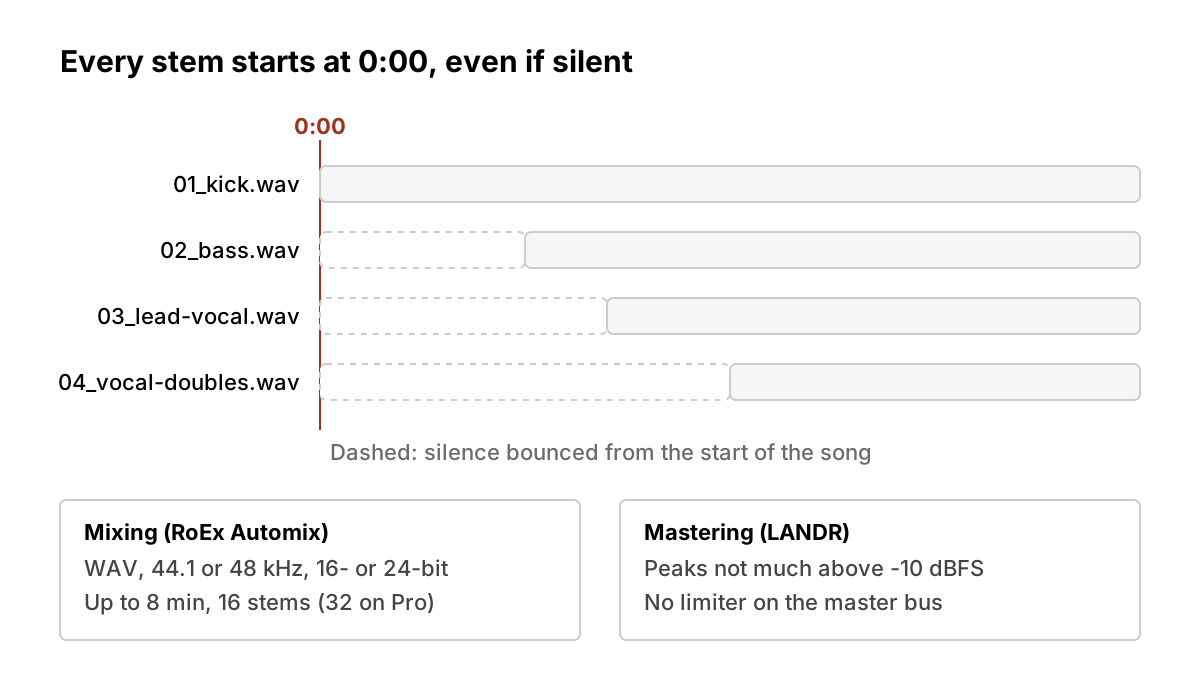
RoEx's help page says mixing accepts WAV only, at 44.1 kHz or 48 kHz and 16- or 24-bit. A mix can be up to 8 minutes long, and you can upload 16 stems per mix, or 32 on its Pro subscription. Mastering on the same service takes WAV or MP3, with lossless WAV "strongly recommended" and MP3 at 192 kbps or higher if you must. The page also says downloads are rendered at 44.1 kHz / 16-bit, which matters if you planned to deliver a higher-resolution master elsewhere.
Its tips page is blunter about compressed files: avoid MP3, because it introduces artefacts that affect how Automix reads the audio. RoEx's guide for Suno users says the same for generated material: always export WAV, because MP3 quality loss compounds through further processing. If your generator offers a WAV download, use it.
Alignment and level
Every stem should start at 0:00, "even if silent", according to the help page. In practice that means bouncing each track from the very start of the song, not from where the part comes in. Stems that start at different points can't be lined back up automatically.
The same page asks you to make sure no track is too quiet or silent, and to avoid uploading muted stems. The tips page adds: "Keep levels sensible", and if a track is distorting or barely registering, fix that first. Clean up file names too. RoEx asks for plain letters, numbers, dashes or underscores, with no symbols or emoji.
Processing and labels
RoEx says "Don't over-process your stems before uploading", and warns that if tracks are already heavily limited or clipped, the mastering stage has less room to work. Leave the corrective processing to the service and keep what is part of the sound you want.
Labels are where artists lose the most. Automix asks you to assign each stem a category, and its tips page is specific:
- Use Drums only if the stem holds a full kit. Individual drum elements go under Kick, Snare or Cymbals.
- Hi-hats are Cymbals. Claps go under Snares.
- Bells, synth bells and music box sounds go under Cymbals.
- Vinyl crackle, noise and atmospheric FX go under FX or Other. Don't force them into an instrument category.
- Where you can, separate the lead vocal from harmonies and doubles.
That last point is worth planning for when you bounce. A lead vocal on its own stem can be treated as a lead; one fused with its doubles can't.
Mastering a finished mix: what LANDR asks for
LANDR's prep guide (March 2024) is aimed at its own engine, but it reads as sound advice for any mastering upload.
Headroom
LANDR calls headroom one of the most common mix mistakes it sees in uploads. Its target is peaks "not much above -10 dBFS" with the body of the waveform around -18 dBFS, and it asks you to keep that headroom while recording, through your busses and at the master output. Pulling the master fader down at the end is not the same thing as a mix that was balanced with room to spare.
The master bus
LANDR says EQ, saturation and light character compression on the master bus are "fair game" if they get you closer to your sound. What to avoid are plugins that affect overall gain and headroom, "like limiters or aggressive compression". If you're unsure, it suggests leaving them out. In other words, take your loudness plugin off before you export. The service sets the final level.
Noise and edits
LANDR asks you to remove extra noise from every clip, delete empty regions (they can hold low-level sound that raises the noise floor), and turn off analog-noise modelling in vintage-style plugins. It also suggests short 5-10 ms fades at the start and end of every clip to avoid clicks.
Export
Keep the sample rate you recorded at. Export at 32-bit if your DAW allows it, or 24-bit if that's the highest option, and tick dither for anything other than 32-bit. The file should be a high-resolution WAV or AIFF.
Reference before you send
Compare your mix against songs in your library and your own earlier mixes, and play it on laptop speakers, earbuds and a car stereo. LANDR's point is perspective: the service can't fix a balance problem you never heard.
Once it's mastered, the level platforms play it at is a separate question, covered in our streaming loudness guide.
A checklist before you upload
- Fix the source problems first. Tempo drift, noise and phase are not things a mixing service is asked to solve.
- Bounce lossless. WAV (or AIFF for LANDR), at your session sample rate, 24-bit or better where the service accepts it.
- Start every stem at 0:00 and check the lengths match.
- Check every stem plays. No silent, muted or near-silent files.
- Strip limiters and clipping. Keep the effects that are part of the sound; remove the ones that only make it louder.
- Leave headroom. For a mastering upload, aim for LANDR's figures: peaks not much above -10 dBFS.
- Split lead vocal from doubles and label every stem honestly, using the service's own categories.
- Name files plainly, for example
04_lead-vocal.wav. - Check the limits: length, stem count and output resolution, before you plan your release around the result.
- Keep your stems and session. If the result is wrong, you want to fix one stem and resend, not rebuild.
What we think
These services are often sold as a way to skip the hard part. Their own help pages say otherwise. Almost every rule above, from 0:00 alignment to labelling hi-hats as cymbals to leaving headroom, is the same thing a human mix or mastering engineer would ask for. The automation removes the conversation, so the prep has to say everything the conversation would have.
That makes prep the part artists control, and the part that decides the result more than which service they choose. An honest, well-labelled, unlimited set of stems gives any engine something to work with; a clipped MP3 with the doubles fused to the lead gives it nothing. We'd also like services to publish their specs on one stable page. RoEx's limits sit in a dated FAQ and LANDR's prep advice in a blog post from 2024, so artists are left checking more than one page to learn what the upload form wants. Until that changes, read the upload page on the day you send, and keep the session so you can try again.
Sources
- Automix Help & FAQs: Downloads, Stems, Uploads, Billing, RoEx
- How to Get the Most Out of Automix, RoEx, 23 Apr 2026
- From Suno to Your DAW via Automix, RoEx, 11 Mar 2026
- How to Prepare your Music for LANDR Mastering, LANDR, 4 Mar 2024
Sources
- Automix Help & FAQs: Downloads, Stems, Uploads, Billing, RoEx (primary source). Accessed 24 Oct 2026.
- How to Get the Most Out of Automix, RoEx (primary source). Accessed 24 Oct 2026.
- From Suno to Your DAW: How to Take AI Music into Ableton Live, Bitwig & Fender Studio via Automix, RoEx (primary source). Accessed 24 Oct 2026.
- How to Prepare your Music for LANDR Mastering, LANDR (primary source). Accessed 24 Oct 2026.
Researched with AI assistance, written and checked by WATMM Desk.